Remixの toast notification
はじめに
Remix で以下のような toast notification を実装する方法について試行錯誤したログです。
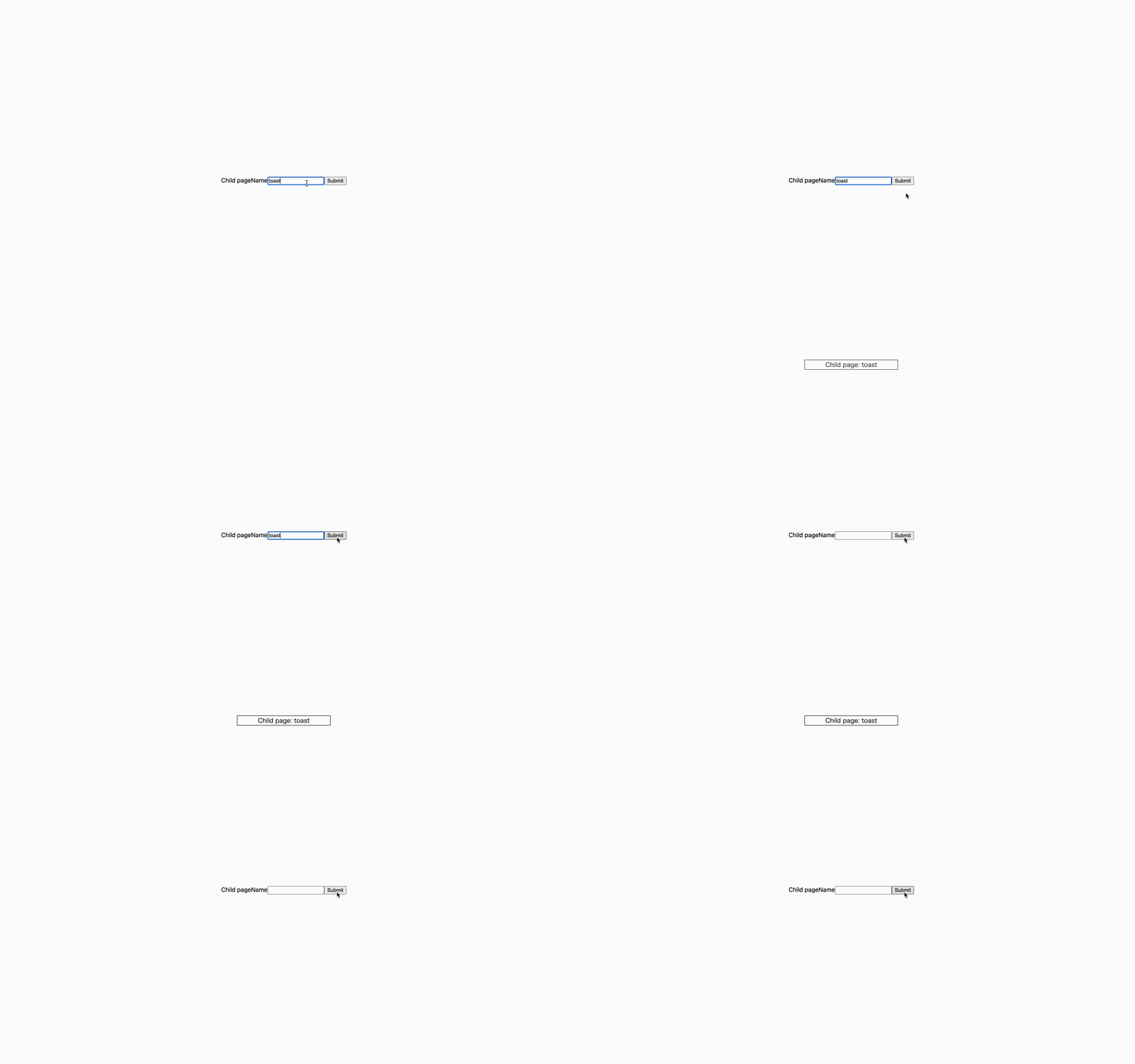
今回紹介するサンプル実装はこちらのリポジトリに置いています。 https://github.com/Kazuhiro-Mimaki/remix-toast-notification
単一のページにおける toast
まずは単一のページ内で何かしらのデータを送信し、その成功・失敗を toast で表現したいというケースについて考えます。
実装はシンプルで form submit -> action のレスポンスを useActionData で取得 -> toast を表示という流れになります。
実装イメージ
export async function action({ request }: ActionFunctionArgs) {
  const body = await request.formData();
  const name = body.get("name");
  return json({ data: name });
}

export default function Index() {
  const data = useActionData<typeof action>();

  return (
    <div>
      {data && <Toast message={data.data} />}
      <form method="POST">
        <label htmlFor="name">Name</label>
        <input id="name" name="name" type="text" />
        <button type="submit">Submit</button>
      </form>
    </div>
  );
}
共通化する
多くの場合、toast の取り扱いはアプリケーションで共通化したくなると思います。 その場合、複数のページにおいて上記と同様の toast を表示したいので、context で状態を持ちます。
- toast の情報を管理する Provider を作る
- の Provider を親 route に設定する
- 子となる route では、action の結果を監視して toast を表示する
実装イメージ
1. toast の情報を管理する Provider を作る
type ToastContextType = {
  toast: string;
  showToast: (toast: string) => void;
};

export const ToastContext = createContext<ToastContextType>({
  toast: "",
  showToast: () => 0,
});

type Props = {
  children: ReactNode;
};

export const ToastProvider = ({ children }: Props) => {
  const [toast, setToast] = useState("");

  const showToast = (toast: string) => {
    setToast(toast);
  };

  return (
    <ToastContext.Provider value={{ toast, showToast }}>
      {toast && <Toast message={toast} />}
      {children}
    </ToastContext.Provider>
  );
};
2. 1. の Provider を親 route に設定する
import { Outlet } from "@remix-run/react";

import { ToastProvider } from "~/context/toast";
import styles from "../styles/common.module.css";

export default function Index() {
  return (
    <ToastProvider>
      <Outlet />
    </ToastProvider>
  );
}
3. 子となる route では、action の結果を監視して toast を表示する
export async function action({ request }: ActionFunctionArgs) {
  const body = await request.formData();
  const name = body.get("name");
  return json({ data: name });
}

export default function Index() {
  const data = useActionData<typeof action>();
  const { showToast } = useContext(ToastContext);

  useEffect(() => {
    if (data?.data) {
      showToast(`Child page: ${data.data}`);
    }
  }, [data?.data]);

  return (
    <div>
      <p>Child page</p>

      <form method="POST">
        <label htmlFor="name">Name</label>
        <input id="name" name="name" type="text" />
        <button type="submit">Submit</button>
      </form>
    </div>
  );
}
redirect 時にも toast を表示したい
ここまでの実現方法は、データリクエストから結果のフィードバックまでが単一のページ内で完結している場合に有効ですが、結果のフィードバックが別の画面で行われる時には利用できません。例えば、一覧画面から詳細画面に移動し、詳細画面で何かしらの更新リクエストを送った後、一覧画面に遷移して初めて更新リクエストが成功したかどうか toast でフィードバックされるケースなどです。
remix の action はその route(ページ)内における更新系リクエストを取り扱うので、リクエスト時の画面とフィードバックを表示する画面が異なる場合には別の方法を考える必要があります。
そこで、今回は cookie と nested routes を利用した実装方法について考えてみます。
手順としては以下になります。
- 親 route の loader で、cookie に保存されている toast を取得して表示する
- 子 route の action では、更新処理を行った後 cookie に toast の情報を保存し、redirect する
- redirect 先の route では親 route の loader が呼ばれるため toast が表示される
実装イメージ
1. 親 route の loader で、cookie に保存されている toast を取得して表示する
export const loader: LoaderFunction = async ({ request }) => {
  const session = await getSession(request.headers.get("Cookie"));
  const toast = session.get("toast") as string | null;
  const headers = new Headers()
  headers.set("Set-Cookie", await commitSession(session));
  return json({ toast }, { headers });
};

export default function Index() {
  const { toast } = useLoaderData<typeof loader>();

  return (
    <div>
      {toast && <Toast message={toast} />}
      <Outlet />
    </div>
  );
}
toast の情報を取り扱う cookie を作成
export const { getSession, commitSession } = createCookieSessionStorage({
  cookie: {
    name: "toast",
  },
});
2. 子 route の action では、更新処理を行った後 cookie に toast の情報を保存し、redirect する
export async function action({ request }: ActionFunctionArgs) {
  const body = await request.formData();
  const name = body.get("name");

  // 省略 (データ更新のAPIリクエストなど)

  const session = await getSession();
  session.flash("toast", toast);
  const headers = new Headers()
  headers.set("Set-Cookie", await commitSession(session));
  return redirect("/to", { headers });
}

export default function Index() {
  return (
    <div>
      <p>Submit and redirect "/to"</p>

      <form method="POST">
        <label htmlFor="name">Name</label>
        <input id="name" name="name" type="text" />
        <button type="submit">Submit</button>
      </form>
    </div>
  );
}
3. redirect 先の route では親 route の loader が呼ばれるため toast が表示される
export default function Index() {
  return <Link to="/from">back to "/from"</Link>;
}
全ての画面に toast notification を適用したい場合はトップレベルの route である root.tsx の loader で cookie の情報を見てあげればいいかなと思います。今回は説明しやすくするために 親 route / 子 route での簡易実装をサンプルとしました。
最後に
以上、Remix の toast notification についてでした。 他にもより良い実装がないか引き続き深ぼっていきたいと思います。
